
Home Services
Start with the problem.
Services
Every service here answers a problem you may have. Find yours, see how the work happens and what shapes the price, then decide whether to start a project.
In preparation. All six services are written. The comparison between them and the diagrams are below.
Web Development
Fast, responsive websites built to convert visitors — from first wireframe to launch day.
The problem
what goes wrongPeople look you up before they contact you. If what they find is missing, outdated or hard to use, many will simply go elsewhere.
You may recognise this
- You have no website, only a social media page or a listing.
- Your site looks old, or nobody remembers how to change it.
- It is difficult to use on a phone.
- It loads slowly, or pages do not work the way visitors expect.
- Visitors cannot tell what you offer or what to do next.
Without a website of your own, you do not control the first impression.
The solution
how RG approaches itA website designed around one question: what should a visitor understand and do? The work starts from sketches of the pages, not from a template, so the structure fits your content.
What is actually created
- The pages you need, planned and drawn before they are built.
- A layout that adapts to phone, tablet and desktop.
- One clear action on each page, such as contact, order or read more.
- Code that loads quickly and can be maintained afterwards.
When you need it
who and when- Starting outA new business, project or idea that has no website yet.
- Looking datedAn existing site that is old, slow or poor on phones and needs a redesign.
- One offerA landing page for a single product, event or service.
- Showing workA portfolio, a product catalogue or a business site that presents what you do.
Not sure which service fits? Describe the problem in the project brief and it will be placed in the right one.
How it works
eight steps- DiscoveryA conversation about who the site is for and which problem it must solve.
- RequirementsPages, features, content and limits are written down.
- PlanningThe page structure and the order of the work are set.
- SketchingEvery page is drawn on paper first, so you can react to the idea before anything is built.
- DesignThe sketches become a visual design: colours, type, spacing.
- DevelopmentThe pages are built and made to work on every screen size.
- TestingPhone, tablet and desktop are checked, along with links and forms.
- DeliveryThe site goes live and you receive what was agreed.
Before building starts, the scope, price, deadline and included changes are agreed. Extra work is never started without your approval.
Project planning
what to prepareBring what you have. You do not need all of it to start a project; the brief asks for the type of project, its goal, features, budget and timeline, and the rest is clarified in discovery.
- RequirementsWhat the site must do, and who it is for.
- AssetsLogo, photos, brand colours and anything you already have.
- ContentThe texts for each page, and the languages they are in.
- Technical decisionsA domain name, hosting, an existing site, and whether you need forms or accounts.
- Expected deliverablesWhat you expect to receive at the end.
What shapes the price
no fixed listThere is no fixed price list. Two sites with the same number of pages can need very different amounts of work, so the price is agreed after the brief has been reviewed, together with the scope and the timeline.
- Project complexityHow much the site has to do beyond showing information.
- Number of pagesEvery page needs content, design and testing.
- Number of featuresForms, galleries, language switching and similar parts.
- Design complexityA simple layout and a custom, animated one are not the same work.
- IntegrationsConnections to other tools and services.
- Backend requirementsAnything that needs a server or a database.
- Third-party servicesA domain, hosting or paid tools can have costs of their own.
- Time requirementsA short deadline changes how the work can be planned.
- MaintenanceWhether you want ongoing care after launch.
- Price
- Agreed per project
- Price guidance
- To be announced
Differences
website, app or softwareWebsites, web applications and custom software are different things. Choosing the right one saves time and money.
- WebsiteVisitors read, look and get in touch. The pages are mostly the same for everyone.Choose it to be found and understood.
- Web applicationVisitors sign in, enter information and see their own data. It needs a backend and a database.Choose it when people need accounts or data they can change.See Applications & Software
- Custom softwareA tool built around one organisation's own process. It may run on a computer or a phone and work offline.Choose it for your own team's workflow.See Applications & Software
The highlighted one is this service. The other two belong to Applications & Software. All the differences
What you receive
final deliverables- The sketches and the page structure that were agreed.
- The visual design.
- The finished, responsive website.
- Testing on phone, tablet and desktop.
- Launch: the site goes live.
The exact list, and the form each item takes (for example whether you receive the source files), is agreed in writing before work starts. To be announced.
Related projects
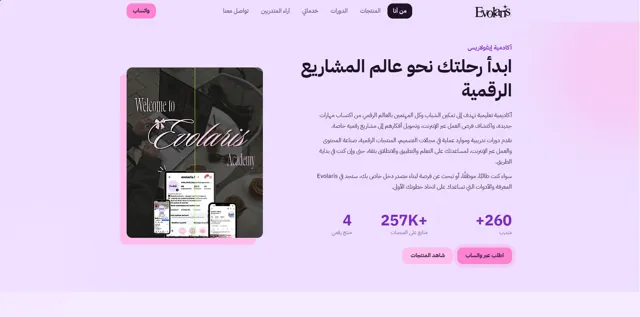
examplesTwo examples from the Work section. They show what this kind of work looks like; they are not client success stories.
Start a project
next stepDescribe your project in a few short questions: its type, goal, features, budget and timeline.
Start a project3D Experiences
Real-time scenes and product viewers that react to every move of the cursor.
The problem
what goes wrongA flat page shows an object or a space from one angle, and the visitor has to imagine the rest. When the shape, the parts or the feeling of a place matter, a picture is not enough.
You may recognise this
- Your product has depth or parts that photos cannot show together.
- Visitors cannot turn or inspect an item before they decide.
- You need to explain how something is built or arranged in space.
- Your page looks like every other page in your field.
- You have a 3D idea, but you do not know whether it can run in a browser.
A picture shows one angle. A 3D scene lets the visitor choose it.
The solution
how RG approaches itA real-time 3D scene that runs in the browser. It is planned on paper first: what the visitor sees, from where, and what they can do with it. Then it is built, and tested on the devices people actually use.
What is actually created
- A scene or viewer that opens in the browser, with nothing to install.
- An interaction chosen for the purpose: the scene reacts to the cursor, a product can be turned and examined, or the scene moves as the page scrolls.
- A look designed on purpose: shapes, colours, light and the page around the scene.
- A check on how it runs on phones, because 3D asks more of a device than a normal page.
When you need it
who and when- Showing a productA product that people want to see from every side before they decide.
- Telling a storyA page where a scene changes as the visitor scrolls.
- Explaining a thingA machine, a space or a process that is easier to understand in three dimensions.
- Being rememberedA portfolio or a brand page that should not look like the others.
Not every site needs 3D. If the goal is to inform and be easy to use, a website is usually the better start.
How it works
eight steps- DiscoveryA conversation about what the 3D has to show, and why a flat page is not enough.
- RequirementsThe objects, the interactions and the devices it must run on are written down, along with what already exists.
- PlanningThe scenes, the way they sit in a page and how heavy they may be are set.
- SketchingThe scene and its camera views are drawn first: shapes, angles and how the visitor moves through it.
- DesignThe sketches become a look: colours, light, materials and the page around the scene.
- DevelopmentThe scene is built and connected to the page, with cursor, touch or scroll interaction.
- TestingPhone, tablet and desktop are checked: load time, smoothness and what happens on a weaker device.
- DeliveryThe scene goes live and you receive what was agreed.
Before building starts, the scope, price, deadline and included changes are agreed. Extra work is never started without your approval.
Project planning
what to prepareBring what you have. You do not need all of it to start a project; the brief asks for the type of project, its goal, features, budget and timeline, and the rest is clarified in discovery.
- RequirementsWhat visitors should be able to do with the scene, and on which devices.
- Assets3D models if you have them, drawings or photos of the object, logo and brand colours.
- ContentThe text that goes with the scene.
- Technical decisionsWhether it is a new page or part of an existing site, and how old a device it must support.
- Expected deliverablesWhat you expect to receive at the end.
What shapes the price
no fixed listThere is no fixed price list. A small scene with one object and a large one with many can need very different amounts of work, so the price is agreed after the brief has been reviewed, together with the scope and the timeline.
- Scene complexityHow many objects there are, and how detailed they are.
- InteractionLooking, turning, clicking or scrolling: each adds work.
- Model preparationWhether 3D models already exist or have to be prepared.
- Design complexityLighting, materials and animation.
- Device targetsThe older the phone it must run on, the more careful the work.
- IntegrationsConnections to other tools or product information.
- Third-party servicesHosting for large files, paid models or licences can have costs of their own.
- Time requirementsA short deadline changes how the work can be planned.
- MaintenanceWhether you want ongoing care after launch.
- Price
- Agreed per project
- Price guidance
- To be announced
Differences
website, app or softwareA 3D experience, a website and an application are different things. Choosing the right one saves time and money.
- 3D experienceA scene or viewer that visitors look at and move around in: a product viewer, a scroll-driven story, an interactive space.Choose it when seeing and exploring is the point.
- WebsitePages that inform and are easy to find and use. 3D is at most an accent.Choose it when information and clarity matter most.See Web Development
- ApplicationA tool built around a task, with accounts and saved data. It may include 3D.Choose it when people will use it again and again.See Applications & Software
The highlighted one is this service. A 3D scene can also sit inside a website. All the differences
What you receive
final deliverables- The sketches of the scene and its camera views that were agreed.
- The visual design of the scene and the page around it.
- The finished 3D scene or viewer, built to run in the browser.
- Testing on phone, tablet and desktop, including how smoothly it runs.
- Launch: it goes live on your site or on a page made for it.
The exact list, and the form each item takes (for example whether you receive the source files), is agreed in writing before work starts. To be announced.
Related projects
examplesA 3D example for this page is not ready to show yet.
To be announced.
Start a project
next stepDescribe your project in a few short questions: its type, goal, features, budget and timeline.
Start a projectApplications & Software
Web apps, dashboards and internal tools that turn messy workflows into one clear screen.
The problem
what goes wrongWhen a process lives in spreadsheets, paper notebooks and chat messages, nobody sees the whole picture. Work gets repeated, information gets lost, and the process depends on the people who happen to remember it.
You may recognise this
- Your records are spread over spreadsheets, paper and messages.
- The same information is typed in more than one place.
- Only one person knows where things are, or how the process works.
- Several people work on the same data, and a shared file shows everyone everything.
- Ready-made software does more than you need, or not what you need.
- The tool stops working when the internet connection does.
A process that is held together by habits is hard to hand over, check or grow.
The solution
how RG approaches itAn application built around one process: who does what, with which information, and what each person needs to see on one screen. It is planned on paper first, with the screens, the roles and the data, and then built and tested on the devices it will be used on.
What is actually created
- A web app, dashboard or internal tool for a process that was defined with you.
- The accounts and roles it needs: who may see and who may change what.
- A database that keeps the information in one place, and connections to the tools you already use where that is needed.
- Dashboards that gather the figures that matter on one screen.
- A version for a computer or a phone where the work calls for it, planned to keep working offline and to update when the connection returns.
When you need it
who and when- Outgrown spreadsheetsA process that has become too big or too important for spreadsheets, paper or chat messages.
- A team toolAn internal tool where staff enter and follow work, each with their own role.
- Numbers in one placeA dashboard that brings figures from different places onto one screen.
- Must keep workingA shop, school or office tool that cannot stop when the connection drops.
If visitors only need to read and get in touch, a website is enough. An application is for when people enter, change and follow information.
How it works
eight steps- DiscoveryA conversation about the process: who does what today, where it breaks down and what a good day would look like.
- RequirementsThe users and their roles, the information to be stored, the screens and the tools to connect with are written down.
- PlanningThe data, the permissions and the stages of the work are set, and so is the order.
- SketchingThe screens, the way a person moves through them and how the information is connected are drawn before anything is built.
- DesignThe sketches become the interface: clear screens for the tasks people repeat every day.
- DevelopmentThe interface, the database and the logic behind them are built, together with the accounts and permissions.
- TestingEvery role is tried with realistic information, on the devices it will be used on, and where it applies, with the connection lost.
- DeliveryThe application is set up where it will run and you receive what was agreed.
Before building starts, the scope, price, deadline and included changes are agreed. Extra work is never started without your approval.
Project planning
what to prepareBring what you have. You do not need all of it to start a project; the brief asks for the type of project, its goal, features, budget and timeline, and the rest is clarified in discovery.
- RequirementsHow the process works today, who uses it, and what each person must be able to do.
- AssetsYour current spreadsheets, forms or documents, some sample information, logo and brand colours.
- ContentThe names of the fields, categories and labels, and the languages the interface must use.
- Technical decisionsBrowser, computer or phone; which accounts and roles; whether it must work offline; which tools it connects to; where the data is kept.
- Expected deliverablesWhat you expect to receive at the end.
What shapes the price
no fixed listThere is no fixed price list. An application with one kind of user and a few screens and one with several roles, reports and connections are very different amounts of work, so the price is agreed after the brief has been reviewed, together with the scope and the timeline.
- Project complexityHow many separate processes the application has to cover.
- Number of pagesEvery screen needs design, building and testing.
- Number of featuresSearch, reports, exports, notifications and similar parts.
- Design complexityA plain, working interface and a custom designed one are not the same work.
- IntegrationsConnections to the tools you already use.
- Backend requirementsAccounts, roles, a database and the rules behind them. In an application they are central.
- Third-party servicesHosting, a database service or paid tools can have costs of their own.
- Time requirementsA short deadline changes how the work can be planned.
- MaintenanceProcesses change, so consider whether you want ongoing care after launch.
- Price
- Agreed per project
- Price guidance
- To be announced
Differences
website, app or softwareA web application, custom software and a website are different things. Choosing the right one saves time and money.
- Web applicationOpens in the browser. People sign in, enter information and see their own data. It needs a backend and a database.Choose it when people need accounts or data they can change.
- Custom softwareA tool built around one organisation's own process. It may run on a computer or a phone and work offline.Choose it for your own team's workflow.
- WebsitePages that inform. Visitors read, look and get in touch, and the pages are mostly the same for everyone.Choose it when people only need to read and get in touch.See Web Development
The two highlighted ones belong to this service. A website is the third, in Web Development. All the differences
What you receive
final deliverables- The sketches of the screens and the structure of the information that were agreed.
- The visual design of the interface.
- The finished application, with the accounts and roles that were agreed.
- Testing of every role, on the devices it will be used on.
- Launch: it is set up where it will run, and you can start using it.
The exact list, and the form each item takes (for example whether you receive the source files), is agreed in writing before work starts. To be announced.
Related projects
examplesTwo examples from the Work section: a study platform with an AI quiz generator, and a school desk that works offline. They show what this kind of work looks like; they are not client success stories.
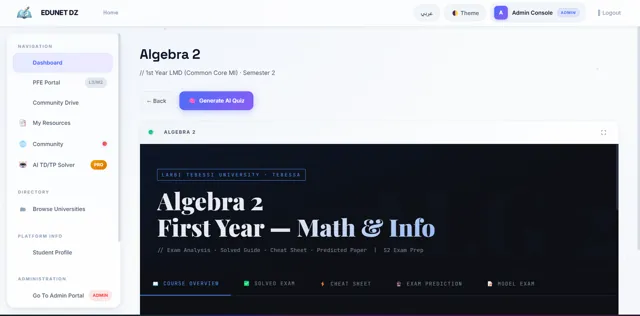 Edunet DZStudent learning platformA study platform for university students: courses, solved exams, cheat sheets and an AI quiz generator.See it in Work
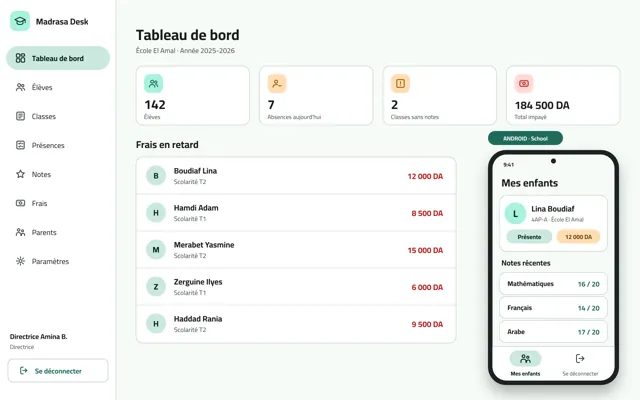 MadrasaWindows + Android appAn offline-first desk for private schools: students, classes, attendance, grades and fees on Windows, with teacher and parent views on Android.See it in Work
Start a project
next stepDescribe your project in a few short questions: its type, goal, features, budget and timeline.
Start a projectUI/UX Design
Wireframes evolve into clear, accessible interfaces people understand at a glance.
The problem
what goes wrongAn interface that people have to figure out costs you visitors and users. They do not read instructions: they look, try something and leave if it does not work.
You may recognise this
- People start a task and do not finish it.
- Users ask how to do things the screen should already make obvious.
- Every page or screen looks a little different from the others.
- The design works on a desktop but is hard to read or tap on a phone.
- Text is small or low in contrast, so some people cannot read it comfortably.
- A project is about to be built, but nobody has drawn what it should look like.
Building a confusing interface well only makes the confusion permanent.
The solution
how RG approaches itInterfaces that are drawn and tested before they are coded. The work starts with the people who will use the screen and the task they came to do, and moves from rough wireframes to a detailed, consistent design.
What is actually created
- Wireframes of the screens, and the way a person moves from one to the next.
- A visual design for desktop and mobile, with clear, readable text and controls.
- A design system: the colours, type, spacing and components that keep every screen consistent.
- A prototype you can click through, where the project needs one.
- Accessibility considered from the start: contrast, text size and a layout that works without a mouse.
When you need it
who and when- Before buildingAn idea or a project that needs to be drawn and agreed before any code is written.
- A confusing productA website or application that people find hard to use.
- Many screensA product that is growing and needs one consistent set of rules.
- A fresh lookAn existing interface that works but looks old or does not match your brand.
Design can stand on its own, or be the first stage of a website or an application. Either way the sketches come first.
How it works
eight steps- DiscoveryA conversation about who uses the interface, what they came to do and what is going wrong today.
- RequirementsThe screens, the tasks, the devices and the brand rules that exist are written down.
- PlanningThe structure of the screens and the order of the work are set.
- SketchingIdeas are drawn by hand, then turned into wireframes, so layouts can be compared before any design effort is spent.
- DesignThe chosen wireframes become the visual design for desktop and mobile, with colours, type, spacing and components.
- DevelopmentWhere the project includes it, the design is turned into a clickable prototype, or built as a working interface.
- TestingThe design is tried against the real tasks, on phone and desktop, with a check of contrast, text size and keyboard use.
- DeliveryYou receive the design and the design system as agreed.
Before building starts, the scope, price, deadline and included changes are agreed. Extra work is never started without your approval.
Project planning
what to prepareBring what you have. You do not need all of it to start a project; the brief asks for the type of project, its goal, features, budget and timeline, and the rest is clarified in discovery.
- RequirementsWho the interface is for, which tasks it must support, and what is wrong with the current one.
- AssetsLogo, brand colours, fonts, photos, and screenshots or links of any existing interface.
- ContentThe real texts and information the screens will hold, or the closest you have.
- Technical decisionsWhich devices it must work on, and whether the design will be built by RG or by someone else.
- Expected deliverablesWhat you expect to receive at the end: drawings, a design, a prototype or a design system.
What shapes the price
no fixed listThere is no fixed price list. Designing three screens and designing a whole product with a design system are very different amounts of work, so the price is agreed after the brief has been reviewed, together with the scope and the timeline.
- Project complexityHow many different tasks and kinds of users the interface has to serve.
- Number of pagesEvery screen is sketched, designed and checked, on desktop and on mobile.
- Number of featuresForms, dashboards, filters and other parts that need their own layouts.
- Design complexityA restrained layout and a rich, illustrated or animated one are not the same work.
- IntegrationsDesigning around the information and tools the interface has to connect to.
- Backend requirementsAccounts, roles and data change which screens are needed.
- Third-party servicesPaid fonts, stock images or design tools can have costs of their own.
- Time requirementsA short deadline changes how the work can be planned.
- MaintenanceWhether you want the design system kept up to date as the product grows.
- Price
- Agreed per project
- Price guidance
- To be announced
Differences
website, app or softwareDesign, a website and an application are different things. Choosing the right one saves time and money.
- UI/UX designThe drawn and designed interface: how it is organised, how it looks and how a person moves through it. It is not yet working software.Choose it when the interface must be right before, or independently of, the build.
- WebsiteA design that has been built as pages people can visit.Choose it when you want the finished pages.See Web Development
- ApplicationA design that has been built as a tool with accounts and saved data.Choose it when people will work in it every day.See Applications & Software
The highlighted one is this service. Design is also the middle stage of the other two. All the differences
What you receive
final deliverables- The sketches and wireframes that were agreed.
- The visual design of every agreed screen, for desktop and mobile.
- A design system: colours, type, spacing and components.
- A clickable prototype, if it is part of the agreement.
- A check of contrast, text size and keyboard use.
The exact list, and the form each item takes (for example which design file format you receive), is agreed in writing before work starts. To be announced.
Related projects
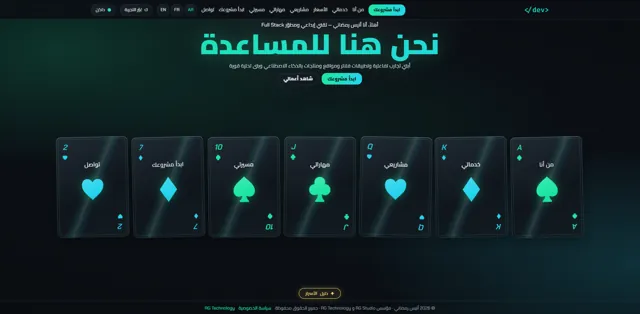
examplesTwo examples from the Work section: a portfolio where the playing cards are the navigation, and a right-to-left landing page in Arabic. They show how an interface decision looks in practice; they are not client success stories.
Start a project
next stepDescribe your project in a few short questions: its type, goal, features, budget and timeline.
Start a projectCreative Technology
Connected objects and interactive systems — custom ideas where code meets art.
The problem
what goes wrongSome ideas do not fit a page or an app: a visual that is generated by code, an installation that reacts to people, an object that talks to the internet. Standard tools do not cover them, and a plain description of the idea is not enough to know whether it can be built.
You may recognise this
- You have an unusual idea and cannot find anyone who builds that kind of thing.
- You want something that reacts to people, to sound, to movement or to data.
- You want visuals that are generated by code and are never exactly the same twice.
- An object, a device or a sensor has to be connected to software.
- You are not sure whether the idea is possible, or what it would take.
An idea that nobody has tried to draw and test stays an idea.
The solution
how RG approaches itA custom interactive piece, built where code meets art. It starts as a sketch and a small experiment, so you can see whether the idea works before the whole thing is built, and then it is developed into a working system.
What is actually created
- A written and drawn definition of the idea: what happens, who or what triggers it, and what the visitor sees.
- A working prototype that tests the core of the idea first.
- The finished interactive piece: generative visuals, an interactive installation, or a system that connects objects, screens and software.
- A check on how it behaves in the place and on the devices where it will really run.
When you need it
who and when- An unusual ideaA concept for an interactive piece that does not fit a normal website or application.
- Visuals from codeGenerative or animated visuals for a screen, a brand, an event or a page.
- An installationAn interactive piece for a space, an exhibition or an event.
- Connected objectsA device, sensor or object that has to be linked to software or to the internet.
If you are not sure whether your idea is possible, that is exactly what discovery and the first small experiment are for.
How it works
eight steps- DiscoveryA conversation about the idea: what should happen, for whom, and where it will be experienced.
- RequirementsThe behaviour, the inputs and outputs, the place, the devices and any hardware are written down.
- PlanningThe idea is divided into parts, the riskiest part is found, and the order of the work is set.
- SketchingThe idea is drawn: the pieces, how they connect and what the visitor sees and does.
- DesignThe sketches become a look and a behaviour: shapes, colour, motion, and how the piece responds.
- DevelopmentA first small version tests the core of the idea, then the whole piece is built and connected.
- TestingThe piece is tried in the real conditions it is meant for, with real people, devices and unexpected input.
- DeliveryIt is set up where it will run and you receive what was agreed.
Before building starts, the scope, price, deadline and included changes are agreed. Extra work is never started without your approval.
Project planning
what to prepareBring what you have. You do not need all of it to start a project; the brief asks for the type of project, its goal, features, budget and timeline, and the rest is clarified in discovery.
- RequirementsWhat the piece should do, what sets it off, and what people should experience.
- AssetsSketches, references, images, sounds, brand material and any objects or devices you already have.
- ContentAny text, images, sound or data the piece will show or react to.
- Technical decisionsWhere it will run (a screen, a space, a browser), which devices or sensors are involved, and whether it must work without internet.
- Expected deliverablesWhat you expect to receive at the end.
What shapes the price
no fixed listThere is no fixed price list. A generative visual on a screen and a system that connects several objects are very different amounts of work, so the price is agreed after the brief has been reviewed, together with the scope and the timeline.
- Project complexityHow many parts the piece has and how they depend on each other.
- Number of pagesIf the piece sits in a page or a screen, how many views it needs.
- Number of featuresEach behaviour, input or reaction adds work.
- Design complexityMotion, visual detail and how finished the look has to be.
- IntegrationsLinks to devices, sensors, data sources or other software.
- Backend requirementsAnything that has to store data or run on a server.
- Third-party servicesHardware, hosting, licences or paid tools can have costs of their own.
- Time requirementsA short deadline changes how the work can be planned.
- MaintenanceInteractive pieces often run for a long time, so consider whether you want ongoing care.
- Price
- Agreed per project
- Price guidance
- To be announced
Differences
website, app or softwareCreative technology, 3D experiences and applications can overlap. Choosing the right one saves time and money.
- Creative technologyA custom interactive piece that does not follow a standard pattern: generative visuals, installations, connected objects.Choose it when the idea itself is unusual.
- 3D experienceA 3D scene or viewer that runs in the browser, such as a product viewer or a scroll-driven story.Choose it when what visitors see in 3D is the point.See 3D Experiences
- ApplicationA tool built around a task, with accounts and saved data.Choose it when people will use it again and again.See Applications & Software
The highlighted one is this service. A creative piece can include 3D, or be part of an application. All the differences
What you receive
final deliverables- The written and drawn definition of the idea that was agreed.
- The first working prototype that tests the idea.
- The finished interactive piece.
- Testing in the conditions it is meant for.
- Launch: it is set up where it will run.
The exact list, and the form each item takes (for example whether you receive the source files or any hardware instructions), is agreed in writing before work starts. To be announced.
Related projects
examplesA creative technology project for this page is not ready to show yet. The homepage Lab holds small experiments in the same spirit, but they are experiments, not client projects.
To be announced.
Start a project
next stepDescribe your project in a few short questions: its type, goal, features, budget and timeline.
Start a projectAdditional Solutions
Branding, hosting, security, SEO and ongoing care — everything around the build.
The problem
what goes wrongA good build is only part of what a project needs. A site that is not set up well, not protected, not findable and not looked after can fail quietly, and nobody notices until a visitor or a customer does.
You may recognise this
- Your business looks different on every page, card and message.
- You are not sure where your site is hosted, or who controls the domain.
- Nobody has checked how well the site is protected.
- People who search for what you offer do not find you.
- Something broke after launch and there is nobody to fix it.
- Your software is out of date, and updating it feels risky.
What is not looked after tends to break at the worst moment.
The solution
how RG approaches itThe work that surrounds a build, chosen to fit your project. You pick the parts you need rather than a fixed package, and each one is agreed in the same way as the main work.
What is actually created
- Branding: a consistent look for your project, with colours, type and the rules for using them.
- Hosting: choosing where the project runs, and setting up the domain and a secure connection (HTTPS).
- Security: measures that fit the project, such as protected sign-in, safe forms and keeping software up to date. No project can be made impossible to attack, so the text of the agreement says exactly what is covered.
- SEO foundations: clear page titles and descriptions, a sensible structure and fast pages, so search engines can understand the site. Rankings are never promised.
- Maintenance: ongoing care after launch, such as updates, fixes and small changes.
When you need it
who and when- LaunchingA project that is about to go live and needs hosting, a domain and a secure setup.
- Looking consistentA business whose look changes from one place to another and needs one clear identity.
- Being foundA site that works but that search engines and people struggle to understand.
- Staying healthyA site or application that must keep working, and needs somebody who looks after it.
These can be agreed as part of a project, or on their own after it. The brief shows which one you need.
How it works
eight steps- DiscoveryA conversation about what exists today, what worries you and what could go wrong.
- RequirementsWhich of the parts you need, and what each one must achieve, are written down.
- PlanningThe order of the work is set, and what has to be done before the launch is separated from what comes after.
- SketchingFor branding, the identity is drawn first: marks, colours and how they are used. For the other parts, the setup is drawn as a simple diagram.
- DesignThe identity is finished and written down as rules, and the setup is decided in detail.
- DevelopmentThe setup is carried out: the domain, hosting, protection and search foundations, or the update routine.
- TestingEverything is tried as a visitor would: the site opens over HTTPS, forms work, pages load, and what was set up behaves as agreed.
- DeliveryYou receive what was agreed, with a clear explanation of what was set up and what still needs care.
Before building starts, the scope, price, deadline and included changes are agreed. Extra work is never started without your approval.
Project planning
what to prepareBring what you have. You do not need all of it to start a project; the brief asks for the type of project, its goal, features, budget and timeline, and the rest is clarified in discovery.
- RequirementsWhich of the parts you need, and what has gone wrong or worries you today.
- AssetsAny existing logo, colours and brand material, and the address of your site if there is one.
- ContentHow you want to describe your business, and the words people use when they look for it.
- Technical decisionsWhere the site or application runs now, who owns the domain and the accounts, and who can give access.
- Expected deliverablesWhat you expect to receive at the end, and how often you want ongoing care.
What shapes the price
no fixed listThere is no fixed price list. Setting up one domain and looking after a large application are very different amounts of work, so the price is agreed after the brief has been reviewed, together with the scope and the timeline.
- Project complexityHow many of these parts you need, and how they connect to the project.
- Number of pagesHow many pages or sites the work has to cover.
- Number of featuresWhat has to be protected, set up or kept up to date.
- Design complexityFor branding, how large and how detailed the identity has to be.
- IntegrationsOther tools and services the setup has to work with.
- Backend requirementsServers, databases and accounts that have to be secured and looked after.
- Third-party servicesDomains, hosting plans and paid tools are charged by their providers, often on a regular basis, in addition to the work.
- Time requirementsA short deadline changes how the work can be planned.
- MaintenanceHow often and how much care you want after launch, which is agreed separately.
- Price
- Agreed per project
- Price guidance
- To be announced
Differences
website, app or softwareAdditional solutions are not the build itself. They surround it. Choosing the right service saves time and money.
- Additional solutionsThe things around a project: its identity, where it runs, how it is protected, how it is found and how it is kept healthy.Choose them when the build exists, or is planned, and needs the rest.
- Web DevelopmentThe website itself: its pages, layout and code.Choose it when the site must be built.See Web Development
- Applications & SoftwareA tool with accounts and saved data, built around a process.Choose it when people must work in it every day.See Applications & Software
The highlighted one is this service. It can be added to either of the other two. All the differences
What you receive
final deliverables- The identity rules, if branding is part of the agreement.
- A working setup: domain, hosting and a secure connection, if included.
- The protection and search foundations that were agreed.
- A short explanation of what was set up and what still needs care.
- Ongoing care, only if it was agreed and for the period that was agreed.
The exact list, and the form each item takes (for example which accounts and access you receive), is agreed in writing before work starts. To be announced.
Related projects
examplesA project that shows this kind of work is not ready to show yet.
To be announced.
Start a project
next stepDescribe your project in a few short questions: its type, goal, features, budget and timeline.
Start a projectWhich one do you need? differences
Start from your situation
six situationsStart from what you are trying to fix. Each line names a situation and the service that answers it.
- Visitors cannot find or understand what I offer.Web Development→
- People should be able to turn, explore or move through my product.3D Experiences→
- My process lives in spreadsheets, paper and messages.Applications & Software→
- My interface is confusing, or nobody has drawn it yet.UI/UX Design→
- I have an unusual idea that does not fit a page or an app.Creative Technology→
- It is built, but it needs a domain, protection, a look or care.Additional Solutions→
Two lines can fit one project. Say so in the brief, and the work is split between the services.
Website, application or software
the three that get mixed upA website, a web application and custom software are the three that get mixed up most. The difference is what people do with them.
| Website | Web application | Custom software | |
|---|---|---|---|
| What people do | Read, look and get in touch. | Sign in, enter information and see their own data. | Do their organisation's daily work in a tool made for it. |
| Accounts and saved data | Not needed. | Yes. | Yes, as the process needs. |
| Backend and database | Usually not. | Yes. | Yes, in some form. |
| Where it runs | In any browser. | In any browser. | On a computer, a phone or both. |
| Without a connection | It needs one. | It usually needs one. | It can be planned to keep working. |
| Choose it when | You want to be found and understood. | People need accounts or data they can change. | It is your own team's workflow. |
| The service | Web Development | Applications & Software | Applications & Software |
| A project of this kind in Work | Evolaris Academy A landing page | Edunet DZ A study platform | Madrasa A school desk, Windows and Android |
The three are not ranked. A bigger one is not a better one; the right one is the one that fits the problem.
Still not sure?
ask with the briefNot sure which one fits? Describe the problem in the project brief, in your own words. It is placed in the right service, and if the idea needs more than one, the work is split between them.
Start a project